
Multi-gateway deployment
Create multiple Envoy gateway proxies with Gloo Gateway to segregate and customize traffic controls in an environment with multiple types of traffic, such as public internet and a private intranet.
Gloo Gateway offers an alternative to deploying multiple gateways called Hybrid Gateways. With a hybrid gateway, you can define multiple HTTP or TCP gateways in a single gateway with distinct matching criteria. Hybrid gateways work best in situations where the matching criteria are based on client IP address or SSL config. If so, you can get the benefits of multiple gateways with fewer moving parts and simpler configuration.
Multiple gateway architecture and terminology
Gloo Gateway offers a flexible architecture by providing custom resource definitions (CRDs) that you can use to configure proxies and gateways. These two terms describe the physical and logical architecture of a gateway system.
- Proxies: The physical gateways, or reverse proxies, that are running instances of Envoy as the
gateway-proxypods in your cluster. You define these gateway proxies in the Helm configuration file when you install or upgrade your Gloo Gateway deployment. - Gateways: The logical gateway that is an Envoy listener, which represents a server socket and a protocol. By default, your cluster gets two gateways for handling plain text HTTP and HTTPS connections. To generate more Envoy listeners such as for other protocols, you can create more
GatewayCustom Resources.
See the following diagram for more information about Custom Resource Usage. The blue squares are Kubernetes Custom Resources (CRs), and the Gateway and Gloo circles are Kubernetes deployments that function as controllers for the CRs.
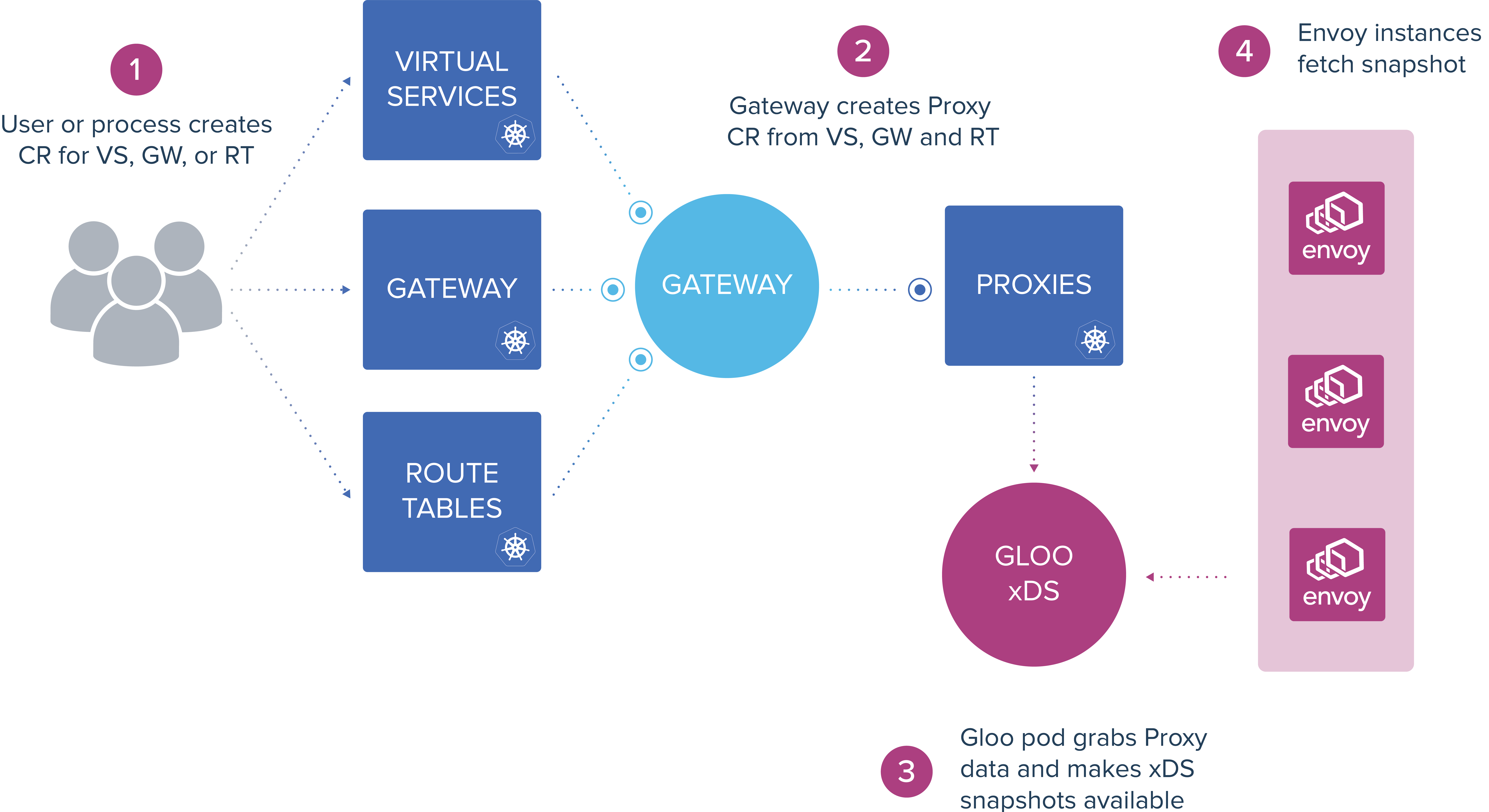
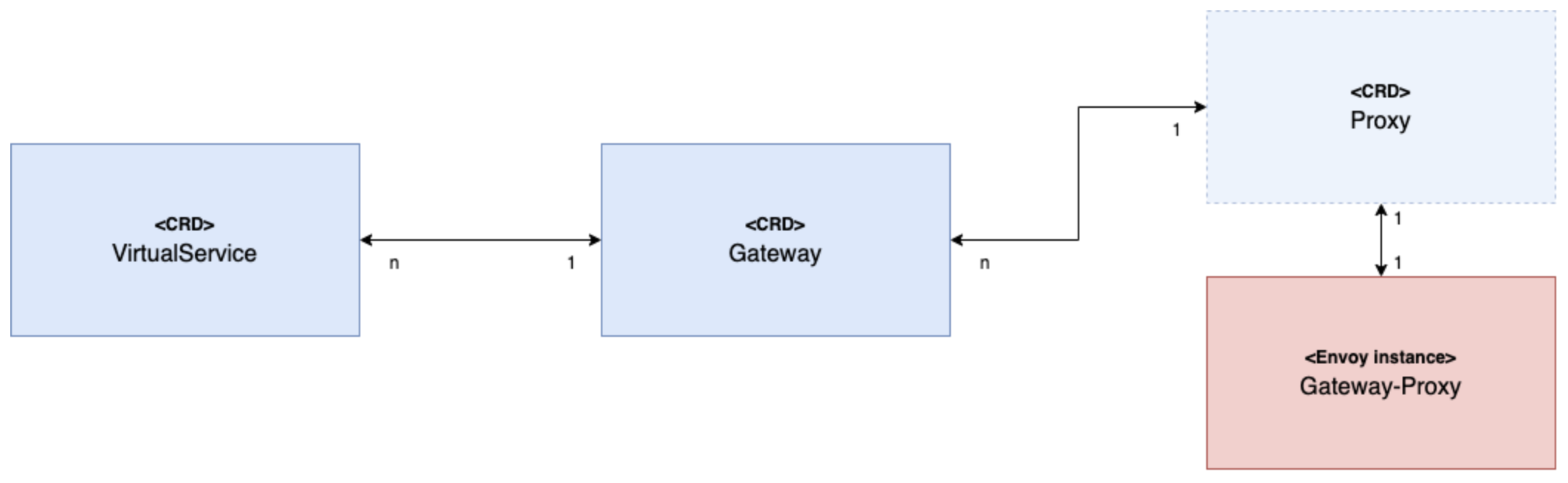
For more detail about how the Gateway and Proxy CRDs interact, review the following diagram and description.
-
From the middle Gateway CRD to the right-hand Proxy and Gateway-Proxy in this diagram:
TheGatewayCRD defines the server host and port that the Envoy listener gateway listens to.
TheProxyCRs are created automatically by the Gloo controller. Do not modify these CRs. Any changes might interrupt the proxy and are overwritten by the Gloo controller.
This setup means you can have several “Gateways”, Envoy listeners, that are bound to a single “Proxy”, or Envoy instance. You can use each gateway to differentiate incoming traffic and apply different server configurations, such as creating separateGatewayCRs for TLS, mTLS, and TCP.
However, you do not have to set up all your gateways to use the same proxy. You can create multiple Envoy proxies in your cluster, as shown in Example configuration for multiple gateway proxies. -
From the middle Gateway CRD to the left-hand VirtualService CRD in this diagram:
You can configure theGatewayCR to select one or moreVirtualServicesby providing a discrete list of virtual services or by using Kubernetes labels.
Additionally, if you define aGatewaywith thessl: truesetting, then you must choose theVirtualServicesby configuring thesslConfigsetting.
The following Gateway example selects a particular Envoy proxy, public-gw, and some VirtualServices with the Kubernetes label gateway-type: public.
apiVersion: gateway.solo.io/v1
kind: Gateway
metadata:
  name: public-gw-ssl
  namespace: default
  labels:
    app: gloo
spec:
  bindAddress: "::"
  bindPort: 8443
  httpGateway:
    virtualServiceSelector:
      gateway-type: public # label set on the VirtualService
  useProxyProto: false
  ssl: true
  proxyNames:
  - public-gw # name of the Envoy proxy
Example configuration for multiple gateway proxies
You can use the following Helm configuration file to create multiple proxies.
publicGw: An internet-facing proxy, with the default HTTPGatewaydisabled so that only secure HTTPS traffic is allowed from the public network.corpGw: A proxy for the company intranet, with the default HTTPSGatewaydisabled so that traffic does not have to be encrypted because the network is private.
Overview diagram:
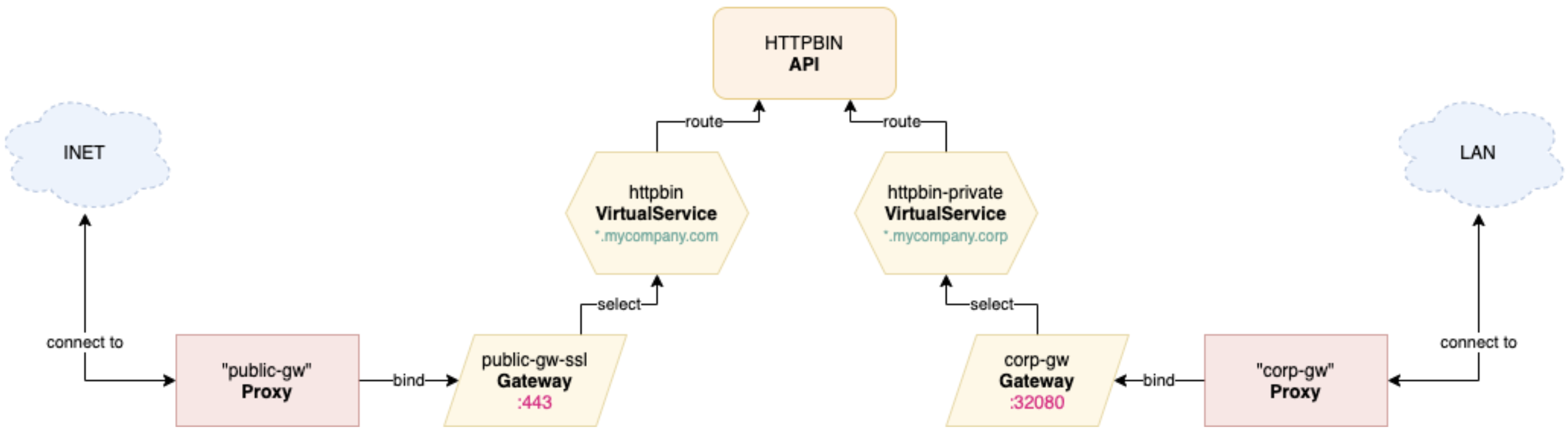
If you want additional Gateways for a single proxy, create your own Gateway Custom Resources, similar to what you can do with VirtualServices. For more information, see the Gateway API reference documentation.
As shown in the following example, you can declare as many Envoy proxies as you want under the gloo.gatewayProxies property in the Helm configuration file.
gloo:
  gatewayProxies:
    publicGw: # Proxy name for public access (Internet facing)
      disabled: false # overwrite the "default" value in the merge step
      kind:
        deployment:
          replicas: 2
      service:
        httpPort: 80
        httpsFirst: true
        httpsPort: 443
        type: LoadBalancer
      tcpKeepaliveTimeSeconds: 5 # send keep-alive probes after 5s to keep connection up
      gatewaySettings:
        customHttpsGateway: # using the default HTTPS Gateway
          virtualServiceSelector:
            gateway-type: public # label set on the VirtualService
        disableHttpGateway: true # disable the default HTTP Gateway
    corpGw: # Proxy name for private access (intranet facing)
      disabled: false # overwrite the "default" value in the merge step
      service:
        httpPort: 80
        httpsFirst: false
        httpsPort: 443
        httpNodePort: 32080 # random port to be fixed in your private network
        type: NodePort
      tcpKeepaliveTimeSeconds: 5 # send keep-alive probes after 5s to keep connection up
      gatewaySettings:
        customHttpGateway: # using the default HTTP Gateway
          virtualServiceSelector:
            gateway-type: private # label set on the VirtualService
        disableHttpsGateway: true # disable the default HTTPS Gateway
    gatewayProxy:
      disabled: true # disable the default gateway-proxy deployment and its 2 default Gateway CRs
This will generate the following two Gateway CRs and also two Envoy deployments called public-gw and private-gw:
$ kubectl -n gloo-system get gw,deploy

NAME                                    AGE
gateway.gateway.solo.io/corp-gw         3m7s
gateway.gateway.solo.io/public-gw-ssl   3m7s

NAME                                                     READY   UP-TO-DATE   AVAILABLE   AGE
deployment.apps/discovery                                1/1     1            1           3m8s
deployment.apps/gateway                                  1/1     1            1           3m8s
deployment.apps/gloo                                     1/1     1            1           3m8s
deployment.apps/gloo-fed                                 1/1     1            1           3m8s
deployment.apps/gloo-fed-console                         1/1     1            1           3m7s
deployment.apps/glooe-grafana                            1/1     1            1           3m7s
deployment.apps/glooe-prometheus-kube-state-metrics-v2   1/1     1            1           3m8s
deployment.apps/glooe-prometheus-server                  1/1     1            1           3m8s
deployment.apps/observability                            1/1     1            1           3m8s
deployment.apps/corp-gw                                  1/1     1            1           3m8s
deployment.apps/public-gw                                2/2     2            2           3m8s
The associated VirtualServices could be something like this:
apiVersion: gateway.solo.io/v1
kind: VirtualService
metadata:
  name: httpbin
  namespace: gloo-system
  labels:
    gateway-type: public # label used by the "public" Gateway
spec:
  sslConfig: # the internet-facing proxy uses TLS
    secretRef:
      name: upstream-tls
      namespace: gloo-system
  virtualHost:
    domains:
    - '*.mycompany.com' # listen on these public domain names
    routes:
    - matchers:
      - prefix: /
      routeAction:
        single:
          upstream:
            name: default-httpbin-8000
            namespace: gloo-system
---
apiVersion: gateway.solo.io/v1
kind: VirtualService
metadata:
  name: httpbin-private
  namespace: gloo-system
  labels:
    gateway-type: private # label used by the "corp" Gateway
spec:
  virtualHost:
    domains:
    - '*.mycompany.corp' # listen on these private domain names
    routes:
    - matchers:
      - prefix: /
      routeAction:
        single:
          upstream:
            name: default-httpbin-8000
            namespace: gloo-system
You can check everything is correct with glooctl commands:
$ glooctl get vs
+-----------------+--------------+------------------+------------+----------+-----------------+----------------------------------+
| VIRTUAL SERVICE | DISPLAY NAME |     DOMAINS      |    SSL     |  STATUS  | LISTENERPLUGINS |              ROUTES              |
+-----------------+--------------+------------------+------------+----------+-----------------+----------------------------------+
| httpbin         |              | *.mycompany.com  | secret_ref | Accepted |                 | / ->                             |
|                 |              |                  |            |          |                 | gloo-system.default-httpbin-8000 |
|                 |              |                  |            |          |                 | (upstream)                       |
| httpbin-private |              | *.mycompany.corp | none       | Accepted |                 | / ->                             |
|                 |              |                  |            |          |                 | gloo-system.default-httpbin-8000 |
|                 |              |                  |            |          |                 | (upstream)                       |
+-----------------+--------------+------------------+------------+----------+-----------------+----------------------------------+

$ glooctl get proxy
+-----------+-----------+---------------+----------+
|   PROXY   | LISTENERS | VIRTUAL HOSTS |  STATUS  |
+-----------+-----------+---------------+----------+
| corp-gw   | :::8080   | 1             | Accepted |
| public-gw | :::8443   | 1             | Accepted |
+-----------+-----------+---------------+----------+